Free PTZ Camera Auto-Tracking Software
A free, brand-agnostic alternative to PTZOptics and Panasonic auto-tracking, for Windows.
If you run PTZ cameras for live events, church services, classrooms or conferences, you know the problem: keeping the camera on a moving presenter normally needs a dedicated operator, or an expensive auto-tracking add-on locked to one camera brand.
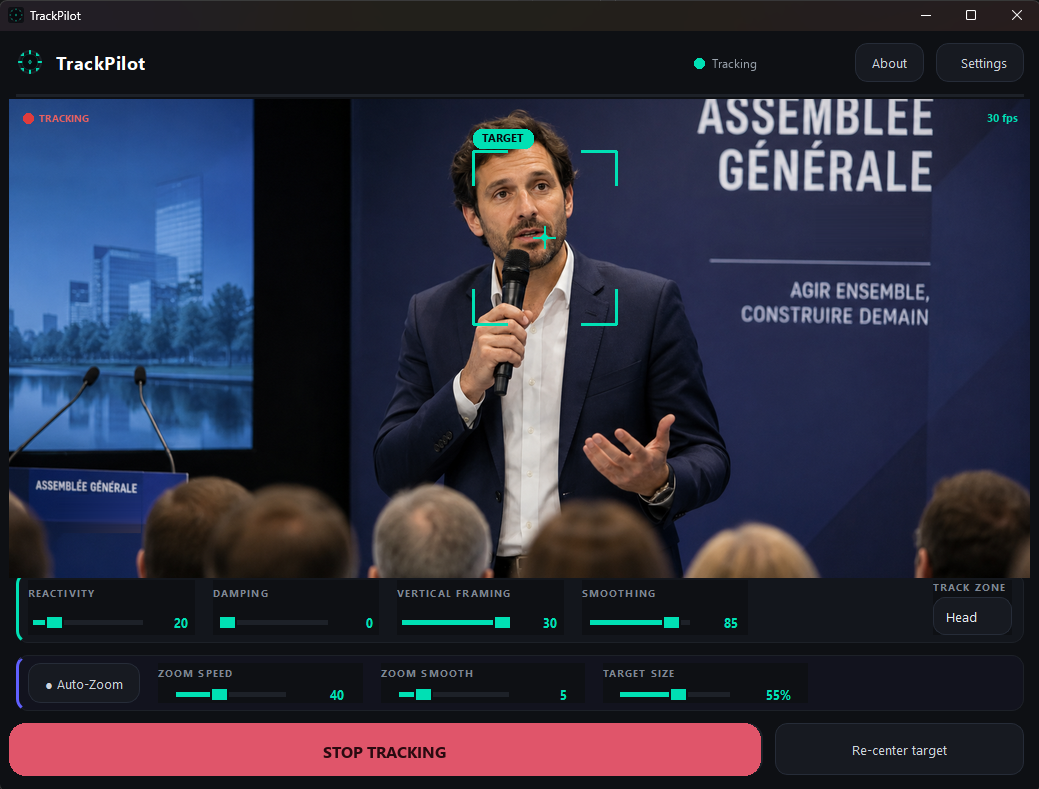
TrackPilot is a free Windows app that does it automatically. It uses AI person detection to follow your subject and smoothly controls the camera (pan, tilt and zoom) in real time, working across cameras from different brands over open network protocols.
How it compares
| TrackPilot | Brand auto-tracking | |
|---|---|---|
| Price | Free | Paid add-on / licence |
| Camera brands | Multi-brand | Locked to one brand |
| Control protocol | Panasonic + VISCA-over-IP | Proprietary |
| Video input | NDI + HDMI/SDI | Varies |
| Runs on existing PC | Yes | Often dedicated hardware |
| AI person tracking | Yes | Yes |
| Auto-zoom | Yes | Varies |
Why choose a free, brand-agnostic option
Most auto-tracking is sold to push a specific camera ecosystem. If you own a Panasonic camera you buy Panasonic's solution; switch brands and you start over. TrackPilot takes a different approach:
- Works with what you already own: VISCA-over-IP covers the vast majority of PTZ cameras on the market (Sony, PTZOptics, Lumens, BirdDog, Aver and more), plus native Panasonic control.
- No per-camera cost: it's completely free, with no subscription, watermark or time limit.
- Software-only: it runs on a normal Windows PC and takes video over NDI or an HDMI/SDI capture card.
- Real-time, smooth tracking: adjustable speed, smoothness and auto-zoom keep your subject framed without jerky moves.
Who it's for
Churches streaming their services, schools and universities recording lectures, conferences, theaters and small productions: anyone who would otherwise need a second person on the camera.
Get started
Download TrackPilot, point it at your camera's video feed (NDI or capture card), enter the camera's network details, and select the person to track. That's it.